 What is the Internet?What is the Internet?
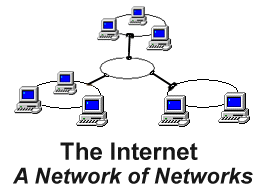
The Internet is a network of networks.
A network is a a group of computers connected together so they can share information. When you connect computers that are in the same room or building and give them the ability to communicate you have a local area network (LAN). The benefits of a local area network are:
To magnify the advantages of a local area network or LAN you can connect two or more LAN's together to create a network of networks. The advantages of a LAN are magnified because there are now more computers that can communicate with each other.
The Internet is not the only network of networks in the world today. Many companies build and maintain their own networks to tie together remote offices. However, there is only one Internet. (That's why we say the Internet and not a Internet.) The Internet is a global network of networks that is open for anyone to connect to.
The Internet provides a new method of communicating facilitated by technology. It follows other methods of communication that are facilitated by technology. For example, telegraph, telephone, radio, and TV.
All methods of communication have certain attributes. First there is the number of people reached. There are exceptions but usually the phone system connects two people, radio several hundred, and TV hundreds of thousands.
The second attribute of any type of communication is the media types supported. The telegraph supports the written word, radio the spoken, and TV the visual world of pictures and video.
The third attribute is the level of interactivity supported. The telephone is very interactive. Radio and TV have no interactivity.
The forth and final attribute we will consider is the accessibility of the medium. The phone system can be used by anyone for about 10 cents a minute. Thirty seconds of network air time during prime time costs about $200,000.
How does the World Wide Web measure up as a communication tool according to these attributes? The Web is an inexpensive, interactive, multimedia, broadcast medium.
The final point I will make is that the Internet is growing in significance with each new person connected. To make an analogy, think about the value of the first fax machine. The first fax machine was of little or no value. (If you owned the first and only fax machine, who are you going to send faxes to?) As soon as the second fax machine was sold and installed the first (and second) fax machine suddenly gained in value. Every fax machine that has been sold and installed since increases the value of the existing fax machines because there are now more people who can send and receive faxes. The same is true with the Internet. As more and more people get connected the value of the Internet grows. It becomes a sort of positive feedback loop that encourages its own growth.
The Internet has its roots in the cold war. In the late 1960's the government was concerned that the existing communication infrastructure (i.e. phone system) couldn't survive a nuclear attach. (I'm sure they were worried about people surviving too, but that's probably covered in a different course...) The phone system is vulnerable because there is often only one path between any two phones. A break in the line along this path would disconnect these two phones (and possibly others). The Internet uses a different way of sending messages that allows for multiple redundant paths between sender and receiver.
The Internet has been around in one form or another for about 30 years. The purpose or function of the Internet has shifted depending on the type and number of people connected. Events in the evolution of the Internet fall roughly into three categories:
Phase 1 (1969-1983). Originally the Internet connected only a few universities and government institutions. During this phase the Internet was used to research new methods of machine communication. The Internet was funded and operated by the Department of Defense's Advanced Research Project Agency (ARPA) and was called the ARPANET.
Phase 2 (1983-1992). A funny thing happened during those early years. The original purpose for developing the Internet was to do research that would lead to more reliable communication networks, but the first people to use the Internet soon discovered it also enabled a new and in some ways better method of communication. They could trade documents, electronics messages, and hold online discussions. During this phase responsibility for maintaining the Internet was transferred from ARPA to the National Science Foundation (NSF) and every university in the united states that had defense related funding was connected. It's during this phase that it became known as the Internet.
Phase 3 (1992-present). Two major things happened at the start of this phase. First the Internet was opened up for commercial traffic and second Tim Berners-Lee and others at CERN (European Nuclear Research Center) invented the World Wide Web.
The World Wide Web (WWW) was built on top of the Internet. You can think of the World Wide Web as the addition of a graphical user interface and hypertext to the Internet. During the early years (before 1992) the Internet was a very unfriendly place for non-techies. If you wanted to access information on the Internet you had to use special tools and remember cryptic commands. For example, to get to the page you are reading now you would have to type:
>ftp 134.193.15.47
>cd cs100/mod.internet/lect
>get LectureText.html
>exit
How did you find this page? Most likely you started a web browser such as Netscape Navigator, selected a bookmark you made for the course, and clicked on a few hyperlinks to arrive here. The tools and techniques you used to find this page are the essence of the World Wide Web. More specifically, the World Wide Web adds:
You already have some notion of what hyperlink is. When you click on text or a picture and it takes you to another page on the Internet you are following a hyperlink. Hyperlinks allow you to connect information on the Internet. The name World Wide Web comes from the idea that by connecting documents through hyperlinks you are creating a web of documents that potentially spans the world.
Hypertext is an underlined or differently-colored word or phrase in a document on the web that when selected will take you to another document on the web. All hyperlinks don't have to be hypertext. In general you can link any media type with any other media type. For example, a picture may be a hyperlink to a sound file.
A web browser is an application (software program) for viewing documents on the World Wide Web. Most web browsers have built-in support for multiple media types including formatted text, images, and audio. The capabilities of a browser may be extended through the use of plug-ins. Plug-ins are extensions that are usually available for free on the Internet. For example, the RealVideo plug-in allows you to view full motion streaming video inside a web page.
Generally speaking, the World Wide Web is that portion of the Internet that can be accessed through a browser by typing in URLs or by following hyperlinks. The Internet generally refers to the computers, wires and low-level protocols that comprise the foundation for the World Wide Web. The terms are, however, sometimes used interchangeably.
No one owns the Internet or World Wide Web. Every organization connected to the
Internet owns a small portion of the Internet. For example, UMKC owns the computers and
wires around campus that make up a small portion of the Internet. UMKC pays a service fee
to organizations such as Sprint and MoreNet to connect to other portions of the Internet.
These service organizations have wires and computers (or switches) that connect
organizations within one region and connections to networks outside their region.
The Internet and web have no central point of authority but there is one organization,
InterNIC, that assigns domain names.
A domain name specifies a computer on the Internet. Domain names are used in URLs and email addresses. Many companies and organizations set up home pages at specific domain names. For example, you can find the UMKC home page at www.umkc.edu. The domain name in the email address burris@cstp.umkc.edu is cstp.umkc.edu. If you send an email to this address you are asking for your message to be delivered to the user burris who has an account on the machine cstp.umkc.edu.
Anyone can register a domain name and many people have made money by registering and then selling domain names. For example, business.com sold a few years ago for $150,000. Don't quit your day job just yet though because the most popular names have already been registered.
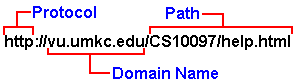
What is a web address or URL?URL is an acronym for Uniform (or Universal) Resource Locator. URLs provide a standard naming convention for specifying objects on the World Wide Web. For example, the URL for the home page at UMKC is http://www.umkc.edu/ Some notes about URLs:
|
Anatomy of a URL |
The cursor changes shape when held over a hyperlink. For example, with Netscape
Navigator the cursor changes to a  when held over a hyperlink.
Hold the cursor steady and single click the left mouse button.
If you hold the cursor over a hyperlink the status bar at the bottom of the window will display the location where the link will take you.
Text links to pages you have seen before show in a different color than links to pages you have not visited. Why is this feature provided? Well, as you may have already experienced, it's easy to get lost on the Web and forget what you have seen and have not seen. Links to pages you have already seen change color to remind you where you have been.
The first thing to recognize is that you can start multiple web browser windows. Having multiple windows open is useful when you need to refer to more than one document at the same time. In Netscape you can open a new browser window by selecting File/New/Navigator Window. You can also open a new window on a specific location by:
Tip!: You can make the most of the time you spend searching for information on the Internet if you start multiple web browser windows. Most search engines provide a list of URLs that match your search request. You could go down the list in order, clicking and waiting, but a much more efficient way to explore each URL returned is to open a new window for each link. With multiple windows you can read the information in one window while information is downloading in another. To accomplish this go down the list of URL's returned by the search engine in order and open a new window for each by right clicking and then selecting "Open in new window". By the time you open the last window the contents in the first window should be ready. By the time you finish reading the information on the first window the information in the second window should have arrived.
 |
 |
Copyright© 1998 by the Curators of the University of Missouri