What do computers do? (input, process, output)
At a very high level a computer performs three functions:
- Input
- Processing
- Output
You first approach a computer because you want to get some work done. You think it will
make your life easier. For example: you want to type a paper, or you want to create a
marketing brochure.
The first step is inputting your data. You enter the data and you tell it to make the
title bold, each paragraph double-spaced, etc.
The processing function is the action or service provided by the computer: it displays
your title as bold, it double-spaces your paragraphs, etc. And when you are done you might
ask the computer to check your spelling.
The most obvious output function is the printing of the completed document when you are
finished. The less obvious output going on is the display of your document as you make
changes and adjustments.
Why are computers frustrating?
This is no surprise to anyone who has used a computer. The first thing to realize is
that you're not alone. You should plan on being frustrated, especially when you attempt to
do something new with your computer. Why are computers frustrating? They are frustrating
for the same reason they are useful: they do exactly what you tell them to do without
deviation and without regard for what intuitively makes sense. Computers have zero
intuition. Actually, it is more accurate to say that computers don't have intuition unless
it is designed into the computer and designing a computer to have intuition is very hard.
Computers are also frustrating because they don't understand natural language (spoken
or written language). As a consequence when you want the computer to do something you have
to know the command or procedure. When you can't remember or find the command it can be
frustrating.
In short, computers are frustrating because:
- They lack intuition.
- You have to adapt to their preference for communication.
What is the difference between data and information?
Information is organized and useful data. For example, at a basketball game individual
statistics (data) are collected: Larry had 8 rebounds, Jim had 2 turnovers, etc.
Information surfaces later after you gather and compile the statistics: your defense
stinks.
Computers are used extensively to turn data into information. Airline companies use
computers to pour through historic data on travel patterns and estimate a ticket price
that will optimize profits for future flights.
What is the difference between hardware and software?
Input, processing and output are good categories for organizing the activities or
actions related to working with computers, but a much better set of categories for
organizing the components is:
- Hardware, and
- Software
Everyone is familiar with the concepts of hardware and software. A VCR is hardware. A
movie you buy to play on your VCR is software. A walkman is hardware. Bob Seger's
Greatest Hits is software.
Since this is a class on computers we are more interested the concepts as they relate
to computers. We will discuss specific components in more detail later in this lecture,
but for now the major hardware components include the components you can see (monitor,
keyboard, etc.) and things you can't see (CPU, memory, disk drive, etc.). The major
software components are the programs you buy for your computer. These include the
operating system (Windows 95, Windows 3.1, etc.) and applications (Netscape web browser,
Microsoft Word, etc.).
How do you determine if a component is hardware or software?
The definition I like is, hardware is anything you can drop on your toe and
software is anything you can be sued for copying.
The distinction between hardware and software is subtle when you talk about media. For
example, you can drop the Bob Seger cassette "Like a Rock" on your toe, so does
that make it hardware? Well, the physical media is hardware, but the songs recorded on the
media are software.
Describe the following categories of computers: supercomputer, mainframe,
minicomputer, server, personal computer, workstation, personal digital assistant.
These categories are used to describe different types of computers. Characteristics
used to classify a computer into one of these categories include: size, speed,
reliability, and expandability. The boundaries between the classifications aren't precise,
however. For example, a very fast personal computer with room for expansion might be
considered a slow, entry-level minicomputer. Also, something working to make it harder to
classify computers is something called Moore's Law. Moore's law is a maxim that goes
something like this: "Every 18 months technology advances by a factor of 2." The
consequence (especially for anyone planning on purchasing a computer) is that 18 months
after you buy the latest computer you usually can find twice the machine for the same
price. This has been happening with precision for the last 10-15 years.
| The boundaries between categories aren't clear, but you can make some approximations: supercomputer
- This is probably the easiest to define. A supercomputer is the fastest computer
available. You can't go by any specific measure of speed, because many workstations today
are as fast as the top-of-the-line supercomputer that was selling just 8-10 year ago.
Characteristic of supercomputers are multiple CPU's (we will define this term later),
and/or very fast CPU's.
mainframe - These computers, while not as fast as supercomputers, are relatively
large and very reliable. IBM was, and probably still is, king of the mainframe. This class
of computer represents a shrinking market because smaller computers (which are less
expansive) are getting faster and more reliable. There are many mainframe computers
installed and it's not easy to change computer systems, so it will be a long time before
they become extinct.
minicomputer - You might find a minicomputer in a small department. A
minicomputer is usually powerful enough to support 10-20 people. The line between a
minicomputer and mainframe is not very precise, though. Some minicomputers can support
many more than 20 people.
server - Finally I get to refer to an image. Figure 1 shows a picture of a
server. A server is a computer used to store data used by many different people. The
server in Figure 1 is the server running the CS100 Virtual University class.
personal computer - Figure 2 shows a typical personal computer. You are probably
reading this now from a personal computer. Again, the lines between the different
categories aren't clear. A personal computer can store data for many different users, but
is generally used to service a single person or user at one time.
workstation - A workstation is fast personal computer. |
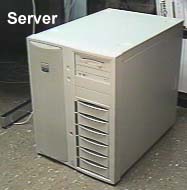
Figure 1. Server
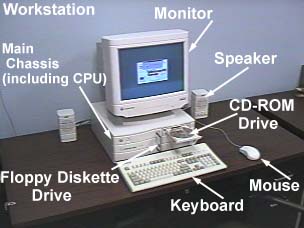
Figure 2. Workstation
|
personal digital assistant (PDA) - The market for PDA's is expanding and is
considered one with lots of potential. There are actually many different subtle somewhat
distinct categories, but their common bond is that they are easily transported or carried
by a person.
What types of personal computers are commonly used today?
The most common types are:
- Macintosh, and
- PC or IBM Compatible Personal Computer
Calling a PC an IBM compatible today is bit of a misnomer. While IBM
legitimized the category in the early 1980's when it came out with its own personal
computer, other companies have capitalized on the market. Today an "IBM compatible
PC" most likely contains an Intel Pentium processor and a version of the
Microsoft Windows operating system. You should recognize the names of both of these
companies. The CEO of Intel is Andy Grove. He was named Time's Man of the Year for 1997.
The CEO of Microsoft is Bill Gates. Bill Gates is the richest man in the world. Is this a
coincidence, or do you think computers are becoming more important to our society?
Macintosh is a line of personal computers manufactured by the Apple Computer company.
The Macintosh runs an operating system call the Mac OS. It's sometimes confusing because
Apple is also the name given to the first line of computers they sold.
The PC has a much greater market share than the Macintosh. I should move quickly
to the next questions before I get into trouble.
Why is there a personal, almost religious, attachment to specific computers,
operating systems, and applications?
This is more of a statement than a question. This is not a class on psychology or
human behavior so I won't attempt to answer it with any authority. I will make
some observations.
First, learning how to use a certain type of computer or application takes a lot of
effort. There will be struggles and there will be victories. Anyone that puts that much
effort into something is bound to feel some attachment.
Second, companies have personalities. To some extent the personality of a company is
reflected in their products. Some people may choose a product (or choose against a
product) because of its perceived "personality."
And finally, a machine that you are familiar with will always be easier to use than one
you are not familiar with.
What are the major hardware components of a computer system?
Well, we finally made it to the topic of this unit: The components of a computer
system. You already know about the distinction between hardware and software. So, let's
start with the major hardware components.CPU - Figure 3 shows a nice close-up of
a CPU. In the picture you see blue fins sprouting up from the motherboard.
Why the fins? There are a lot of electrons running around in the CPU. Even though
electrons are very very small they still have friction. Friction creates heat and the fins
help to dissipate the heat.
If you watch TV you probably have seen the Intel commercials that tell you you need an
Intel Pentium CPU with MMX technology. MMX is a technology that allows your computer
to process multimedia (sound, images, etc.) more efficiently. As more and more computer
programs (applications) are written to take advantage of MMX technology the more
important it will be.
Those with anthropomorphic tendencies would say that the CPU is the "brain"
of the computer. More precisely, a CPU carries out or executes the instructions that are
in a computer program. A computer program is a series of instructions for the computer.
Just as a recipe is a series of instructions that will lead to a delicious result (when
carried out by a competent chef). A computer program is a series of instructions
that will lead to some productive or entertaining result (when carried out by the
CPU). If you could see the instructions that make up a computer program you would be
amazed at how primitive they are. Many of the instructions are simple like add two
numbers, or compare two numbers and do something based on the result of the comparison. A
program is made up of very primitive instructions yet the result is often something
amazing like a 3-D adventure game or the answer to a complex mathematical problem in
seconds. How is this possible? Speed. The CPU is fast. Blindingly fast. Off-the-shelf
personal computers today can perform 50-100,000,000 instructions a second.
Memory or RAM (Random Access Memory) - When someone uses the term
"memory" they are usually referring to RAM. (See the term ROM below.) Figures 3
and 4 show a close-up of memory SIMMs (defined shortly). Memory stores information. As you
type words and commands into the computer that data has to go somewhere. It first goes to
memory. Memory is short-term storage. You should also know that memory is volatile. The
data in memory is lost when you turn off your computer. Memory also affects the speed of
your computer. To a certain point, adding more memory to your computer will speed it up.
Memory often comes in a package called a Single In-line Memory Module (SIMM). A SIMM is a
small circuit board with a handful of memory integrated circuits (IC's) mounted on it.
SIMMs are usually mounted into slots you will find inside your computer when you take the
top off. (See Figure 4.) Installing memory is an upgrade some computer owners perform
themselves. If you do attempt to add memory to your computer, be sure to read the
appropriate section in the manual that came with your computer. There are rules regarding
what type and size of memory is acceptable to your computer and precautions for the actual
installation.
ROM (Read-Only Memory) - ROM is non-volatile memory. The contents of ROM never
change and don't go away when the computer is turned off. Computers ship from the factory
with certain vital programs and data in ROM.
Cache memory - Cache memory is fast memory. When the CPU can, it will store
data in the cache memory. It's like the difference between storing files in a small file
cabinet attached to your desk and storing them in the large file cabinet in the back room.
Files you need often you store at your desk. Your desk filing cabinet isn't large enough
to hold all the files you work with, so you have to store many in the back room. Cache
memory is much faster and smaller than regular memory. Cache memory is expensive, but in
general the more cache memory a computer has the faster it will be. A lot of factors work
together to determine the speed of a computer. Cache memory is one of these factors.
Hard drive - The hard drive is where data and programs are stored. The hard
drive (unlike memory) is long-term non-volatile storage. The data you store to your
hard drive stays there when the machine is turned off. The hard drive resides inside the
case of your computer. (You can just barely see the back side of a hard drive in Figure
5.) Many computers have a light in the front that flickers whenever data is being moved to
or from the hard drive.
You can store files (a word processing document, spreadsheet document, etc.) on your
hard drive, but you should be careful about storing files to the hard drive of a computer
in a public lab. A public lab is just that--public. Anyone can open and read your file.
Second, there is no guarantee your file will be there the next time you use the computer.
You should store files you want to keep to a floppy diskette.
The average hard drive holds about 3 gigabytes of data.
Floppy diskette - Figure 6 shows an image of a 3½ inch floppy diskette. Like a
hard drive, a diskette is long-term non-volatile storage. Unlike a hard drive, a diskette
is portable. Also, the capacity of a diskette is much less than that of a hard drive.
A floppy diskette holds only 1,500,000 characters of information. A big number if you
are talking about dollars or parking tickets, but small when you're talking about data
files. For example, with 1.5 million characters of space you could store:
- 30 Word processing documents, or
- 10 seconds of uncompressed CD quality audio, or
- 1/20 th a second of video
Virtually all Personal Computers ship with a diskette drive. They don't hold much data,
but they are popular because they are so common. You can store a file to a diskette and
feel confident you will be able to use your diskette on any personal computer.
One other thing you should be aware of is that a diskette must be formatted before you
can use it. An unformatted diskette is like a big filing cabinet without any folders. The
computer won't let you save data to an unformatted diskette because it would be impossible
to retrieve the data later. In general you should format your diskettes for the type of
computer you will be using. Diskettes formatted on an IBM PC can be used on a Macintosh,
but diskettes formatted on a Macintosh can't be used on an IBM PC.
Today a new standard is emerging for portable storage—Zip drives.
Zip drive - Figure 7 shows an image of a Zip drive and some Zip disks. A Zip
disk is portable like a floppy diskette but holds much more data, about 70 times as much
as a floppy diskette. Zip drives aren't included on every personal computer yet, but they
are starting to become more common. A Zip disk holds about 100 megabytes of data. |
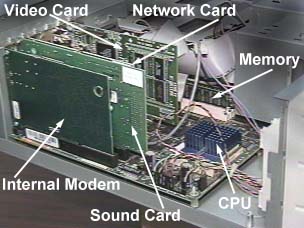
Figure 3. A Closer Look Inside
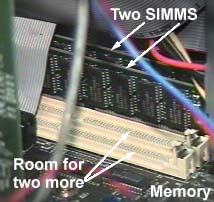
Figure 4. A Closer Look at Single Inline Memory Modules (SIMMS)
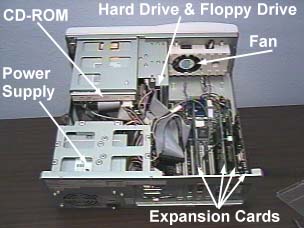
Figure 5. Inside a PC
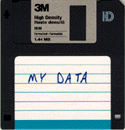
Figure 6. Diskette
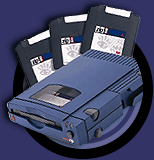
Figure 7. Zip Drive and Disks
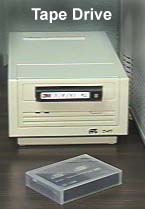
Figure 8. Tape Drive
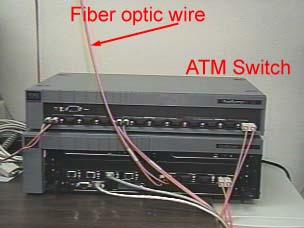
Figure 9. ATM Switch
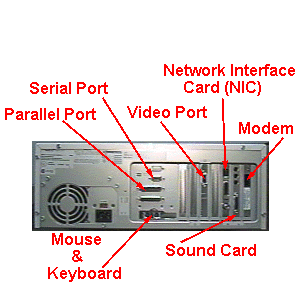
Figure 10. Rear View of a PC
|
Monitor - The monitor is probably the most important output device. Data is
displayed on the monitor in pixels (picture elements). A pixel is the smallest addressable
unit on the screen. Figure 11 shows the start button in the lower left corner of the
screen  enlarged
so that you can see the individual pixels that make up the image.
enlarged
so that you can see the individual pixels that make up the image.
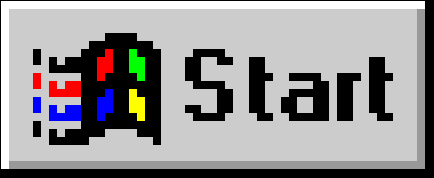
Figure 11. Pixels in Start Menu
The price of a monitor is usually determined by size and clarity. Size is measured in
inches. Typical sizes range from 14 to 17 inches. (Be aware that the "viewable
area" of a monitor will be about an inch less than the advertised size. Many
companies provide figures for both the traditional measurement and viewable area in their
advertisements.) The size of the monitor in general will determine the resolution or how
many pixels can be displayed across and down the display area. A 14-inch monitor will
likely have a display area of 640x480. A 17-inch monitor may have a resolution or display
area as high as 1024x768. There is less room on a low resolution screen and things tend to
look chunky.
Clarity is measured in something called "dot pitch." The lower the number the
better the picture quality. You want a monitor with a dot pitch less than .28 mm.
| CD-ROM - (Compact Disc Read-only Memory) I think everyone is familiar with
music CD players. Well, computer CD-ROM's are very similar. They are both optical storage
devices. (You can even play music CD's through the CD-ROM in your computer.) A CD-ROM
holds about 600 megabytes of data. DVD-ROM drive - (Digital Versatile Disk).
DVD is the next generation of optical storage technology. DVD's hold more data and
are faster than CD-ROM's.
(At one time DVD was an acronym for Digital Video Disk, but the preferred
definition today is Digital Versatile Disk.)
Peripherals - Any part of a computer other than the CPU and main memory. This
includes sound cards, speakers, keyboard, monitor, etc.
Modem - (Modulator/demodulator) Figure 12 shows a picture of an external modem
and Figure 3 shows an internal modem. One way to connect to the Internet is through a
modem. A modem is a device for converting between the digital data inside a computer and
analog audio data that can travel over telephone lines. A modem sits between your computer
and the phone line. It communicates with another modem at the other end of the phone line.
Computers can't communicate directly over phone lines because phone lines were designed to
carry voice data. |
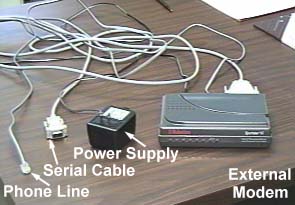
Figure 12. Analog Modem
|
What are the major software components of a computer system?
Software components are a bit more abstract. Hardware components are somewhat easier
to understand because you can see and (most of the time) pickup a hardware component.
Software you can't see. Sure, you can pick
The major software components of a computer system are:
Operating system - All computers have an operating system. Many other devices
you are familiar with have operating systems. For example, a VCR has an operating system.
When you press the eject button, the operating system directs a motor in your VCR to
spit out the tape. Because a computer is a much more powerful (and general purpose) device
the operating system is more complex and visible.
The operating system of a computer has three main functions:
- Control the resources of the computer. For example, if you choose to print a
document before an earlier print request has finished, who do you think keeps the
documents from printing on top of each other? The operating system.
- Provides a user interface. [Caution: approaching subtle concept...] Most people
don't distinguish between the interface and the services provided by a computer. When you
want to start a program you click on the start button and choose the program from the
cascading menu that pops up. Who provides the start button, the cascading menu, and even
the window that the application runs in? The user interface portion of the operating
system. An understanding of this concept will be helpful in the years ahead as we
transition to a voice activated user interface. So instead of pointing and clicking, you
will just say "start my word processor, Dave."
- Provides services to application programs. As you start learning different
applications like Netscape Navigator and Microsoft Word you may experience some deja vu.
For example, you may notice that for these applications the dialog box for printing looks
the same. Did Microsoft and Netscape cooperate to make them look the same? Not a chance.
If you ever see these two companies together it must be a congressional hearing. The
commands and dialog boxes for printing look the same because the operating system provides
common services for printing that both of these programs use. This allows programs that
run on the same operating system to have the same "look and feel". Organizations
like this because it lowers the cost of training.
Some common operating systems are Windows 95, Windows NT, Mac OS, Unix, VAX, and OS/2.
There is something of a debate going on today about what can/should be included in an
operating system. Microsoft would like to make its browser (Internet Explorer) part of the
Windows operating system. This would be good for Microsoft. Windows is the de-facto
standard and it would almost guarantee the success and dominance of its browser. This
would be a bad thing for a company like Netscape, which sells its own browser. The
Netscape browser in a way competes with the Microsoft operating system. This issue has
some people wondering if our anti-trust laws today are outdated for today's technological
environment.
Utilities - With more and more utilities being included into the operating
system the number of utilities outside of the operating system is shrinking. There are,
however, a few common ones. Anti-virus utilities are one very common group (especially in
public labs where it's hard to control what programs are run on the computers.) Anti-virus
utilities detect and remove computer viruses. A virus is a small, possibly malicious,
program that passes between computers usually on floppy diskettes or by computer networks.
Viruses may do permanent damage (like delete all your files) or display annoying messages.
Applications - Applications are the task specific programs you run on your
computer. This class is about the most popular office productivity applications: word
processing, spreadsheets, database, and presentation tools.
How is software developed?
Software development is a team sport. Some programs are written by lone individuals in a
dark room guzzling high-caffeine soft drinks, but most are written by groups of people
including end users, systems analysts, designers, and programmers. Systems analysts work
with end users to identify the problem and the features that are needed in the program.
Designers conceptualize a computer-based solution to the problem identified by the systems
analysts. Designers create a blueprint that computer programmers follow to create the
software program.
I said earlier that a computer program is a series of primitive instruction for
the CPU (things like add, subtract, compare two numbers). It must be quite a chore writing
something like a word processor or computer game using only these primitive instructions,
don't you think? Actually, programmers don't write programs using these primitive
instructions. Programmers write in higher level programming languages and another program,
a compiler, translates the high level instructions programmers write into the lower level
instructions that the CPU executes. Some popular programming languages are C++, Java,
Visual Basic, Fortran, and Cobol.
What is a bit? A byte? A kilobyte? A megabyte? A gigabyte?
These are all units of storage. A bit is the smallest unit of storage. A bit can have
two values. A byte is 8 bits, a kilobyte is 1024 bytes, a megabyte is 1024 kilobytes, and
a gigabyte is 1024 megabytes. These units are often used to describe hardware components.
For example, from a recent computer advertisement I see I can buy a laptop that has,
- A 2.1 gigabyte hard drive
- 32 megabytes of RAM, and
- 200 MHz (megahertz) Pentium Processor
How do you measure the speed of a CPU?
The speed of a CPU is measured in megahertz or millions of cycles per second. The
explanation of a "cycle" is beyond the scope of this course. It's enough to know
that the CPU can execute an instruction (like adding two numbers, or moving data
around) every couple of cycles. So, a CPU that has a speed of 300MHz (millions of
cycles per second) is executing about 100 million instructions a second. That's very fast!
A CPU running at 300MHz is twice as fast as one running at 150MHz, but as you will see
that doesn't mean the computer will seem twice as fast. A lot more than the speed of the
CPU determines how fast applications start, windows move around, and data travels to
and from the disk drive.
Is a computer with a 266 MHz CPU twice as fast as a computer with a 133 MHz CPU? Why
not?
No. More than just the speed of the processor determines how fast a computer will
perform everyday tasks. The speed of the overall computer system is also dependent on the
amount of memory installed, the amount of cache memory, the graphics adaptor,
and the bus.
What is a Local Area Network (LAN)?
A local area network is a group of computers in close proximity connected via wires.
Many LANs are also connected to the Internet. If you are working at a computer in a public
lab chances are the machines around you are connected to form a LAN.
If you are taking this course from home and it seems like it takes forever for the
pages of this course to appear on your computer, find a computer connected to the Internet
via a local area network and your interactions should speed up significantly. A computer
connected to the Internet via a LAN can download Internet content much faster than a
computer connected to the Internet via a modem because a LAN can transport data much
faster than the phone lines that connect modems.
Name three components of a LAN.
We already mentioned wires. Two others are network interface cards and switches. Just
as a modem connects your computer to the phone lines a network interface card connects
your computer to a LAN. Figure 3 shows a picture of a network card.
LANs connect computers and switches connect LANs. The whole Internet is a collection of
LANs and Wide Area Networks connected by switches. Figure 9 shows a picture of an ATM
switch with fiber optic wiring. This is one of the fastest switches you can buy today.
What is telecommuting?
Telecommuting is using technology like e-mail, fax, and computers to work from home.
What makes telecommuting possible?
Inexpensive computers and equipment. The Internet. Fast links from homes to
businesses. Enlightened management.
Final comments
Be sure an check out the Free On-line
Dictionary of Computing. It's a great resource for getting definitions to unfamiliar
terms.