How well do you know word processing?
Some of the following questions refer to this sample document:
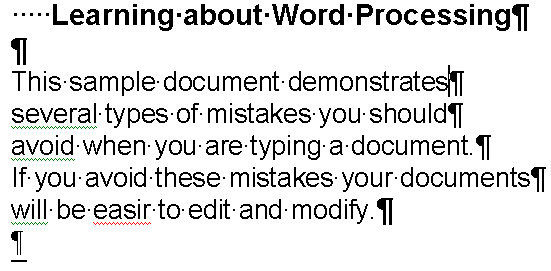
- When the formatting of your document doesn't look quite right what
option can you turn on to "see" where newlines, tabs, etc have been inserted
into your document?
- Open the document above and display invisible characters. What if
anything is wrong with the title?
- The paragraph that starts, "This sample document..." is
which paragraph? (First, second, third, etc.)
- What if anything is wrong with the paragraph that starts, "This
sample document..."?
- How do you format only the first two lines of a paragraph to be
double spaced? Why?
- What is the first step if you want to format 3 paragraphs that are
together with the same features?
- Do you have to highlight all the characters of a paragraph to apply a
paragraph command?
- What does it mean when you highlight two or more paragraphs or
characters and certain options don't show? (Such as alignment for document above)
- How many different indents can you control on a paragraph?
- How many different ways to align a paragraph?
- What are page margins?
- Where to go to set page margins?
- Are footnotes kept in footers?
- Name some characters styles:
- Name two classes of fonts:
- What does the red underline mean?
- What does the green underline mean?
- How can you quickly fix a spelling error in Word?