CS 105P
Buying a Personal Computer
For this assignment, you will be
creating a shopping list (or Wish List) of components to buy that special
computer you have always wanted. You can use a flyer, newspaper ad, or PC Website
from any of the major computer suppliers, to make your selection.
Below, you will find some questions
you will want to consider when shopping for a new PC. Further below, you
will find some example Wish Lists of PC systems.
Once you have reviewed the questions
and picked out a system unit, copy the relevant information into a Word document.
Include a couple of sentences describing
why you chose this particular system. (Remember that cost may be a factor.)
Email your Wish List and reasons
for your selection.
-
 First step in buying a computer is to examine your needs and try
to anticipate how you will use the machine.
First step in buying a computer is to examine your needs and try
to anticipate how you will use the machine.- Second step is to determine how
much you want to spend.
- PC or Macintosh? (Sometimes depends
on software you want to run. Mac has a much smaller market share-5.2%. Most
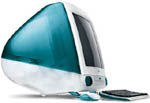
software comes out for the PC before the Mac.) ( iMac is a new very attractive
machine. See image to the right.) Here we consider only a PC?
- Where to buy? (Super stores like
Best Buy, Circuit City, CompUSA, etc. Mail order like Dell and Gateway. Custom,
some people build and sell computers.
- Dell
and gateway are two of the largest
mail-order companies. They both have comprehensive web sites that allow you
to configure and order a system from the Internet. You should be able to visit
both of these sites, and configure a system that is optimal for you.
- Factors that should influence
where you buy? (Free technical support? Industry standard parts? Loaner PC
available?)
- Processor or CPU? (Pentium is
standard. Celeron is "high value" Intel processor. Speed? Pentium
versions: Standard, MMX, Pentium Pro, Pentium II (Pro+MMX), Need speed (at
least 350Mhz to do video or speech recognition.)
- RAM? (SDRAM is faster than EDO)
RDRAM is even faster still. (Many times you can boost the effective speed
more by spending on memory vs processor speed. 32 megabytes should be considered
minimum. 64 is standard.)
- Cache? (Level 1-on chip avg=32K,
and Level 2 off chip avg=256K) More cache can speed applications the same
way more memory can.
- Bus type and number of expansion
slots? (PCI bus is fast, ISA is older) USB is becoming more common. USB
allows you to easily connect low to medium speed components.
- Hard drive? (6-10 gigabytes is
standard. IDE is entry level but fine for most applications. SCSI is faster
and more expensive.)
- Floppy drive is usually standard.
- Zip drive? (Like a floppy but
holds much more data--100 megabytes. )
- Keyboard? (Standard keyboards
are not very comfortable. If you have any kind of wrist pain try an ergonomic
keyboard.)
- Mouse? (3 button mouse allows
you to program the third button)
- Monitor? 17 inch or larger is
best. Monitors last longer then CPUs. You want a super VGA monitor. .28 inch
dot pitch or less is good. New measurement = Aperature Grill. This is a measure
between rows of same color dots rather than diagonal measurement (dot pitch).
This determines how sharp the picture will be. You also want a non-interlaced
monitor.
- Video card? (should have 2 or
4 megabytes of memory) (AGP video cards becoming standard now. Technical details:
new port separate from PCI bus. PCI bus runs at 33Mhz, half CPU/RAM bus speed.
AGP is a separate port that runs at full CPU bus speed--66Mhz. Means less
traffic on PCI bus.)
- CD ROM drive? (16x or better
is best)
- What is a multi-media computer?
(CD ROM + Sound card + speakers)
- What software to get? (WP, SS,
Graphics, Internet, etc)
- Case? (Tower or desktop? Tower
usually has more room for expansion.
- Moore's law - transistor and chip
performance doubles only every 18 months
- Save all paperwork and disks.
You will need it to talk to tech support or to reinstall some day.
- Standard configuration as of March
17, 1998.
- 266Mhz Pentium II
- 64MB SDRAM
- 6GB Hard drive
- 4GB AGP Video Card
- 17" Monitor
- Windows 95
- 56Kbps Modem
- 32x CD-ROM
- Standard configuration as of October
12, 1998.
- 450Mhz Pentium II
- 128MB SDRAM
- 10GB Hard drive
- 8GB AGP Video Card
- 17" Monitor
- Windows 98
- 56Kbps Modem
- 40x CD-ROM
- 100MB Zip Drive
- $2249 (Dell)
- Standard configuration as of November
30, 1999.
- 433Mhz Celeron Processor
- 128MB SDRAM
- 13GB Hard drive
- AGP Video Card
- 17" Monitor
- Windows 98
- 56Kbps Modem
- 48x CD-ROM
- 100MB Zip Drive
- $1531 (Dell)
- Standard configuration as of October
24, 2000.
- 566Mhz Celeron Processor
- 128MB SDRAM
- 20GB Hard drive
- AGP Video Card
- 17" Monitor
- Windows Millennium Edition
- 56Kbps Modem
- 48x CD-ROM
- 100MB Zip Drive
- $998 (Dell)
- Standard configuration as of March
19, 2000.
- 933Mhz Pentium III Processor
(700Mhz Intel Celeron subtract $140)
- 64MB SDRAM (128MB add $60)
- 20GB Hard drive
- AGP Video Card
- 15" Monitor (17"
28dp add $60, 26DP add $110)
- Windows Millennium Edition,
Turbo Tax, MS Office 2000 Small Business Edition
- 56Kbps Data/Fax Modem
- 48x CD-ROM
- Lexmark Z22 Printer
- $969 (Dell