CS 105P
Review for Final Exam
What is the format of the exam?
There will be a variety of questions: mostly short answer, but also fill-in-the-blank,
true/false, multiple choice. The questions will test your understanding of the concepts.
What will the exam cover?
Most of the questions will be on material discussed in class. Much of what was
discussed in class is also covered in the book. There may be a few questions on content in
Capron that wasn't covered in class. (For instance, during chapter discussions when a
point was clearly covered in the book and I didn't have anything to add I would simply say
that a particular section in the book was important or interesting.)
What is the best way to prepare for the exam?
Make sure you understand the questions and statements in this study-guide. All of the
questions on the exam will be taken from the concepts mentioned in this study-guide. Note,
questions won't necessarily be taken directly from this study-guide. Rather, the
concepts required to answer the questions here will be the same concepts required to
answer the questions on the exam.
Hardware and Software
- Difference between hardware and software. Can software be inside a chip? (yes)
- Give a list of items, say whether they are hardware or software. example: Microsoft
Word, CPU, NIC, a book. Is a CD-ROM hardware or software?
Networking and Internet
- What do analog modems do? Modem is also used to describe a device that connects your
home computer to a communication line. For example there are ISDN, cable, and DSL modems.
- Modems are rated at bps (bits per second). 14.4kbps isn't unusual (this is also the top
speed you can get with the Sprint PCS network right now), 28.8kbps is common. 56kbps is
max. Why is 56kbps max? Analog phone lines are designed for voice transmission and there
is a fundamental limit to the amount of data they will carry.
- What is the local loop? (Also called the last mile.)
- What is the last mile problem? Give 3 alternative solutions. (DSL, cable modem, ISDN,
satellite dish) What are the trade-offs? (Cost, availability, speed, reliability)
- What are some of the advantages of fiber optic cable over copper wire? Lighter, less
expensive, larger bandwidth. What is the difference between wire pairs (also called
twisted pair), coax, and fiber optic wire? What type of wire is being installed in some
new homes and apartments? (Category 5 twisted pair.)
- What is a protocol? Name one. (http, https, TCP/IP, ftp, etc)
- (L)Use of a bridge or gateway in a local area network. Bridges, gateways, and routers
are all devices that are used to connect networks.
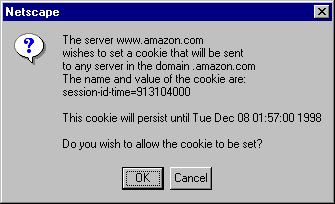
- Explain the message to the right.
- (L)As an alternative to storing information in cookies on your machine a site on the
Internet could store information local to it. It could key this information to the IP
address of your machine. How is this different from storing cookies on your machine? Or,
how could I determine that you submitted a quiz from a machine other than one in our lab?
(IP addresses uniquely identify a machine on the Internet.)
- Define WAN, LAN, Internet, WWW.
- (L) What is a personal area network (PAN). Network within a few feet of your body. Used
to interface PDA's and other electronic devices you may carry.
- What is HTML? Format of documents on the Internet. ie web pages are written in HTML.
HTML source code is sent to a browser for rendering. For example <b>rather
bold</b> don't you think? would be rendered as: rather bold don't
you think?
- What are the parts of a LAN? (Wire, NIC, software)
- (L)What is needed to connect two LAN's together? A switch, gateway, hub, or router.
- What is a portal? Starting point on the Internet. Give an example. Netscape, AOL.
- What is TCP/IP? Standard protocol for computers connected to the Internet.
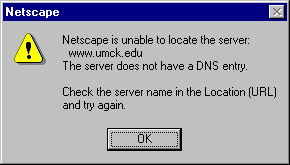
- Internet: machines have names (really numbers or IP addresses that map to names).
DNS (Domain Name Service) is used to map names to numbers. What does the following error
message mean?
- What is the difference between a message traveling across the Internet and a phone call
to a friend? (The message traveling across the internet is broken up into packets of data
before it is sent. The packets are reassembled back into the message at the other end.
This makes the Internet more efficient but also not a good medium for time sensitive
transmissions like live voice and video applications.
- Explain what is happening during the first 3-10 second pause when you start to play
streaming audio on the Internet. (Your computer starts to download the music and creates a
buffer it can draw from when the music starts. This buffer helps smooth out the
fluctuations in bandwidth).
- (L)What is the difference between the Internet and USENET? USENET is the collection of
news groups that get traded over the Internet. How do you search for information on
USENET? (deja.com) What types of information is best found in USENET news groups?
- Difference between the Internet and an intranet? An intranet is a network within a
company that uses Internet protocols software etc.
- What is an Extranet? Many companies use the Internet to connect their Intranets. They
connect there Intranets across the Internet using a secure connection. The connection is
secured by encrypting the communication.
- Why do we say "the" Internet but "an" intranet? There is only one
Internet.
- What is bandwidth?
- What is a URL? What are the common suffixes? (.edu, .ord, .com, .jp, etc) Do URL's have
to begin with WWW?
- (L)What are search engines?
- Give an example of client/server computing. (Browser/Web server, email client/mail
server)
- What is an ISP?
- What is a fire wall?
Miscellaneous
- Given a list of activities, rank the items according to the relative difficulty for a
computer. For example, chess, voice output, touch screens, bar codes, speech recognition,
speech understanding, and hand writing recognition, Speech understanding is
hard/impossible. Chess, speech recognition and hand writing recognition are hard. Tasks
that require cognitive skills are very hard for a computer. Explain.
- Classification of computers? (Super, mainframe, mini, personal, workstation, notebook,
PDA). Difference between a workstation and a personal computer?
- (L-M)What is the difference between object code (low level instructions like Add
register 1 to register 2) and source code (high-level instructions written in a
high-level programming language)?
- How many bits in a byte? Bytes in a word? Bytes in a kilobyte? Kilobytes in a megabyte?
Megabytes in a gigabyte?
- What is a bit? A byte? A bit is the smallest unit of computer data. A bit is a 1 or a 0.
A bit can represent two values. A byte is 8 bits.
- What is a word? Why is word size important on a computer? What does it mean that the new
Sega game player is 128 bit?
- Why do computers like binary numbers?
- (L-M)What is ASCII? What kinds of problems would there be if we didn't have ASCII? Use
your understanding of ASCII to solve a problem. For example, explain what's happening in
the following scenario and recommend a solution: A coworker complains to you that every
time she sends a file from her PC to the mainframe she has to open the file on the
mainframe and fix all the line breaks. For some reason when the file is sent to the
mainframe all of the "returns" at the end of the lines "disappear".
Solution: the problem is likely to go away if she sends the data to the main frame as
ASCII. Many file transfer programs have settings for ASCII as well as binary data types:

If the file is sent as ASCII the file transfer program will compare ASCII
tables between the two machines and convert characters that are different.
(ASCII is a standard for representing character data with binary codes.
99% of the codes are the same between machines. When you are transferring a file from one
machine to another and the codes aren't the same it's easy to convert the 1% of characters
that aren't represented in the same way. The problem is you have to tell the file transfer
program that you are sending ASCII data. When sending binary data between machines you
definitely don't want the file transfer program to be doing an ASCII conversions.)
- (L)What is CAD/CAM?
- (L)What is RAID?
- Soft copy Vs hard copy?
- Freeware Vs shareware Vs public domain Vs copyrighted software.
- Freeware - complete program you can use for free and can copy for free. Usually isn't
copyrighted.
- Shareware - "try before you buy". you may use software for free, but must pay
if you continue to use it. (some shareware you are only required to pay if you want to)
- What is public domain software - software that doesn't have a copyright. Itellectual
property can enter the public domain if the copyright has expired or if the copyright
owner has explicitly abandoned the copyright. Public domain software is software you can
use without cost and without a license.
- What is data compression? Data encryption?
- Can you store your personal data on a CD-ROM? Yes, CD-ROM "burners" are
common.
- (L)What is a device driver? Piece of software that sits between the operating system and
a device. Makes O/S independent of the device.
- (L)Give one example of how magnetic tape is used? Back up files.
- Difference between batch and transaction processing. Give an example of each.
- What is telecommuting?
- If you scan in a word processing document can you edit it? Explain how you might scan
and make changes to a document.
- What is the difference between a PDA and a laptop? What is an information appliance? An
information appliance is normally single function.
- What is the difference between Windows 2000 and Office 2000?
- What are the three main tasks of an O/S?
- Manages the resources of the computer. Resources are memory, disk, and CPU.
- Provides a user interface.
- Provides services for application software.
- How does the O/S relate to application programs?
- Name some O/S’s. MS-DOS, Windows 3.1,Windows 95, Windows CE, Windows NT, Mac OS,
UNIX, IBM MVS, IBM OS/400.
- What is a network O/S?
- Name some things you can do with the O/S? List files on disk. Copy/move files on
disk. Run a program. Play a sound file. Connect to a network. Connect to a printer.
Send/receive a file from across the Internet.
- What is a computer virus? Many computer viruses are passed within macros attached to
office documents.
- Difference between a Worm and Virus?
- What is a macro virus? In MS Word you can embed computer instructions or macros in a
document. When these instructions are executed they can perform rogue things. Data is
passive, code or macros are active.
- What are the stages of the system development life cycle? What happens at each stage?
Preliminary investigation - define the problem, come up with project objectives,
- Systems analysis - understand the current system and develop requirements for the new
system
- Systems design - develop overall concept of new system and detailed specifications for
programmers
- Systems development - programming and testing
- Implementation - put the system into practice.
- Maintenance (80% of the time spent on a system is spent during the maintenance phase.)
History
- (History will be covered by CS106 assessment.)
Lectures
- What does the term broadband mean? Broadband refers to the ability to transmit and
receive data at "high" speeds. A analog voice modem is definitely not a
broadband modem. A cable modem is. An ADSL modem is. Compaq is selling a computer today
that is broadband-ready. It ships with an ADSL modem. An analog modem plugs into the
serial port of a computer. Because a broadband modem carries data at a much higher speed
it plugs into an expansion slot. What kind? PCI.
- What is the last mile problem?
- Why is there a "speed limit" for data traveling over phone lines? Phone lines
have been built and optimized for voice communication. They can't easily handle more
bandwidth or data than what is required to transmit a voice call.
- (L)What is a T1?
- What is bandwidth?
- Difference between World Wide Web and the Internet?
- What is a firewall? Barrier to keep the company secrets in and the bad guys and gals
out. Machine that sits between private company network (Intranet) and public network. Not
only filters information, but also may keep an audit log so there is a record of who
sent/received what information.
- A lot of money is spent on Personal Computers primarily because they have the potential
to make people more productive. Give 3 examples of how personal computers can make an
individual more productive. For example, have you ever typed a paper with a manual
typewriter and bottle of white-out? A word processor is much more efficient because you
can edit your document before printing. Email makes communication more efficient. Handles
multiple media types (text and attachments). You can generally send and receive email from
multiple locations. (If you have a CCTR account you can check email from any lab on
campus.)
- Give a few reasons why PC's are so common today in the work-place.
- Communication. email, groupware, office automation tools.
- Increase productivity. (it not only allows new types of communication it makes it easier
to use old forms. ie letter writing) Specialized tool applications (ie design engineer can
create specifications that can go straight to manufacturing)
- At the same time machines are getting more powerful, they are getting less expensive.
- Integration of machines. Internet. Most word-processing programs allow you to fax a
document from your machine.
- Custom application. You can hire programmers to create an application designed to solve
a specific problem.
- What is groupware? Software that allows people to work together and share information.
- (L)How did PC's enter most companies?
- (L)Example question: T/F Most companies added PC's in an organized and deliberate way.
(F)
- (L)Give an example of a decision support system. Airline reservation. Truck (UPS, Yellow
Freight, Fed Ex) routing, retail POS terminals.
- (L)Why are management information systems and executive support system hard to
implement? (Environment changes quickly, historical data may not be valid today, complex
interrelationships hard to get correct in inner model, hard to quantify certain types of
information)
- Explain how a spreadsheet can be used as a decision support tool?
- (L)What is an ERP system? Enterprise Resource Planning (ERP). Vendors include S.A.P and
PeopleSoft. An ERP system is,
- A software system consisting of many different modules
- Used to automate the different common functions of a business: inventory control,
purchasing/receiving, general ledger, accounts payable, accounts receivable, human
resource, etc.
- Modules are integrated to work together
- Contains much of the logic that is common across industry but if flexible enough to be
programmed to meet the special needs of specific companies.
- Usually less expensive to purchase and customize an ERP system than to create a system
"from scratch" in-house.
- (L)When security or integrity of a computer system is compromised it is usually results
from a problem with the hardware, the software, or the people using the system?
- (L)Name two reasons for backing up your data. 1. Accidental loss of data. 2. Malicious
damage.
- What is encryption?
- Understand how bandwidth affects download times. For example, you are working at a high
school in a lab with 10 computers connected to the Internet with a 50Kbps line. There is a
student on each machine. You ask them to download a file of size 1 megabyte from the
Internet. How long will it take the class to download the file. Answer, the line has a
speed of 50,000 bits per second. Assuming each student shares equally, 50,000 / 10 is
5,000 bits per second per student. The file is 1,000,000 bytes or 8,000,000 bits.
8,000,000 / 5,000 bps is 1600 seconds or about 26 minutes.
- Why does adding more memory increase the spead of your computer? More data (programs,
documents, etc) fits in memory so less time is spent moving data between disk and memory.
- What is dot pitch? Measure of the quality of the picture. What is a good dot
pitch? .28 inch or less.
- What is USB? Universal Serial Bus. New way of connecting peripherals to your personal
computer. Easier, faster. No more IRQ's or DIP switches.
- (fundamentals only)What is a video card? What does it do? A video card performs some of
the processing required to render complex graphical images on the monitor. The CUP might
tell the video card to draw a box. The video card translates the requests from the CPU to
a form the monitor can understand. A video card has memory. AGP video cards becoming
standard now. Technical details: new port separate from PCI bus. PCI bus runs at 33Mhz,
half CPU/RAM bus speed. AGP is a separate port that runs at full CPU bus speed--66Mhz.
Means less traffic on PCI bus.
- What is Moore's law? Transistor and chip performance doubles only every 18 months.
What does this mean for consumers buying computers? In 18 months it’s likely you
will find twice the machine for the same price or the same machine for half the price.
- Name some programming languages. Why do we have programming languages? Why not just
describe the task in English? English is ambiguous. Programming languages have syntax and
semantics that is unambiguous. Why so many programming languages? Different types of
problems. Fortran is used for scientific problems, COBOL for business, Visual Basic for
user interface programs, etc.
- How is right clicking related to objects?
- (L)What are the different job titles related to the programming process? (System
Analyst, System designer, Programmer, Tester) What are the duties and responsibilities
of each category?
- What is the difference between system analysis and design? System analysis comes first.
It is the process of understanding the existing system. System design is the process of
conceptualizing a new system that improves upon the existing system.
- (L)What is prototyping?
- (L)What is outsourcing? May be used selectively when an organization lacks expertise in
a specific area.
- (L)What is a legacy system? What is a proprietary system?
Speech Recognition
- Do handheld PC’s have speech recognition? Is it as good as the speech capabilities
available on desktop computers? Why or why not? A handheld device probably wouldn't have
enough speed or memory to run speech recognition software.
- Discrete speech recognition systems - user must separate each word with a short pause.
Makes it easy to find the beginning and ending of words. Forces user to use consistent
pronunciation.
- Continuous speech - User speaks naturally. Much harder.
- Speaker-independent - No prior training required. A group of people can use the same
system for speech recognition.
- Speaker-dependent - User trains the system by speaking vocabulary words.
- Vocabulary Size - It's much easier to recognize a limited vocabulary.
- (L)Example consumer products: DragonDictate, IBM VoiceType.
Portable Computers
- (L)Classes of systems (Lap Top, Hand Held PC, Palm Top, wearable computers)
- Embedded systems (Special purpose computers. For example, cars have many embedded
computers. One to adjust air fuel mixture. One to provide cruise control.)
- Types of input (character recognition, small keyboard, voice input)
Personal Computers
- Buying a personal computer is much like making any other purchase decision. There are a
variety of options and unless money is an unlimited resource you must make tradeoffs
between features and price. Making a wise purchase decision requires a good understanding
of the value of each feature.
Example question: The 4 major components of a computer system are CPU, Memory, Hard
Disk, and monitor. Evaluate the following (IBM compatible) system. Speculate on the
requirements that motivated the buyer to choose the configuration.
566MHz CPU, 128 MB Memory, 13GB Hard Drive, 17 inch monitor.
32 MB Memory – Relatively small amount of memory. User probably doesn’t
expect to run more than one program at a time. Considering the price performance tradeoffs
the user should probably spend an extra $200 or so to upgrade to at least 64MB of memory.
20GB Hard Drive – Relatively large amount of disk storage. User probably expects
to store lots of data.
14 inch monitor – Relatively small monitor. Highest resolution is 640x480 (vs
1024x768 for a 17 inch monitor). User may not expect to be spending much time at the
monitor. User probably saved $200-$300 over a larger (17 inch) monitor.
- Name some peripherals. (Sound card, video adapter, video capture card, network interface
card, etc)
- Parts of a computer and what they do: CPU, memory, cache, bus, disk, etc. Why does more
memory or cache speed up a computer?
- What is a LAN file server? (Disk located on a remote machine. You are
connected to remote disk via LAN. Remote disk looks very much like a local disk.) Novel is
a file server operating system. Microsoft Windows NT Server is another.
- Storage capacity of common components. Floppy diskette = 1.4 MB. Zip disk = 100 MB.
CD-ROM = 650MB. DVD = 4.7GB.
- DVD = digital video disk or digital versatile disk. Next generation of optical storage
technology.
- Primary storage (cache memory, memory and CPU) Vs secondary storage (diskette, disk
drive, tape drive, CD-ROM)?
- You notice that most of your word processing documents are around 50 kilobytes in size.
About how many word processing documents can you store on one 3 1/2 inch floppy diskette?
- What is a pixel? What's the difference between a computer with a resolution of 640x480
and one with a resolution of 1024x768.
- Web phones. What can you view on a web phone? (Internet sites designed just for small
web phone screens)
Artificial Intelligence
- What is Artificial Intelligence (AI)?
- When does a problem fall into the AI category? (When we can't explain how we as
humans do it. If we can explain how we do it a conventional algorithm is used to solve the
problem.)
- Difficulty of automating something we don't understand.
- Knowledge base = set of facts and rules about facts
- Inference engine - manipulates existing facts to come up with new facts.
- Neural Networks - Computers programmed to mimic the human brain. Can "learn"
from sample data.
- Turing Test. No machine has passed the Turing test.
- Name 3 things that are easy for people to do but hard for computers?
- Recognize speech (ie simply pull words out of a spoken sentence)
- Understand speech (ie a computer would have a hard time understanding the meaning of the
following line from the REM song, "I've said too much; I haven't said
enough...")
- Recognize a face
- Hold up one end of a conversation
- (L)During the speech recognition demo in class the computer performed very poorly when
there was only a slight change in my voice and barely performed at all when someone else
spoke into the microphone. Explain why only a small amount of change had a large change in
it's accuracy. (The computer wasn't performing speech recognition the way we do. No one
knows how we do it so it's impossible to program a computer to perform in the same way we
do. Computers have little tolerance for ambiguity.
- A computer can only do things that can be described in a precise unambiguous way. It
will never be able to make an apple pie like your grandmother can.
- Expert system. Limited domain. Facts and rules. Emulates a human expert. Not very
adaptable. Works poorly at the perimeter of its knowledge.
- Robots = Very successful in limited domains. Still no general purpose robot.
- Virtual Reality. Not very developed. Requires very fast computers. Many future
applications.
- IBM's chess playing program, Deep Blue, regularly beats world chess champions. Is this
AI? How does it do it? Throw hardware at the problem. Computer doesn't try to
"think" like a human, but rather uses it's incredible speed to consider all
possible actions and reactions before making a move. Good human players look at far fewer
moves but use their "intelligence" to quickly rule out "blind alleys".
Performs well in one small domain.
Lab
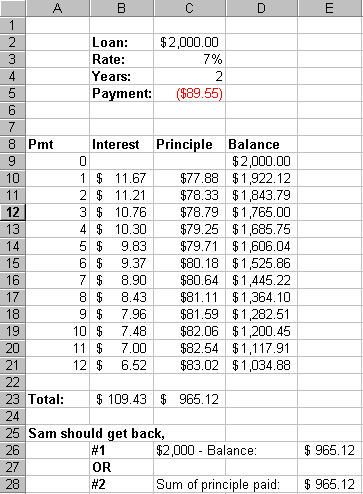
- How do you create and use an amortization table?
Example question: Larry and Sam decide to share the cost of a boat. The boat cost
$4000. Sam doesn’t have $2,000 so Larry agrees to loan Sam $2,000 at 7% interest for
2 years. After one year Larry is transferred to another state and they have to sell the
boat. Luckily they were able to sell the boat for what they paid, $4,000. The problem is
Larry thinks Sam is owed $2,000 minus the twelve remaining monthly payments. Sam thinks he
is owed the total of the payments he has already made since they sold the boat for what
they paid for it.
What were the monthly payments? PMT(0.07/12,24,2000) = $89.55
Which one (if either) is right? Neither Larry nor Sam is correct. Larry
is asking Sam to pay interest on money he isn’t borrowing. At the end of the fist
year Sam owes only the balance due on the loan. Sam doesn’t deserve all the money he
paid toward the boat because some of the money was going toward interest. Sam should get
back only the portion of his payment going toward principle.
Explain the most equitable solution. Here is an amortization table that clearly
shows the equitable solution:
- (H)What is the difference between relative and absolute references in a spreadsheet?
Example question: If the formula =A$1+$B1 is copied from cell C3 to D4 what will the
new value of the formula be? =B$1+$B2, because a $ in front of a row or column
reference holds that row or column reference steady as the formula is copied. Most of the
time you will want to keep both the row and column portion of a reference steady. In that
case you would add a $ in front of both references. For example: =$B$1.
- What is the difference between a formula and a function? A function is a predefined
formula. For example SUM(), PMT(), IF(). A formula is an equation you define. It may
contain a function. For example B1+B2, B1+SUM(A1:A5).
- (H)Assume the contents of a cell is: =sum(A1/A2).
What can you say about the contents of this cell? (It's not as efficient as it can be. The
contents should be: =A1/A2
- What are some of the different number formats you can use in a spreadsheet? Percent,
currency, scientific notation.
- What is the Clipboard? When you cut or copy text or an object it is placed into
the clipboard. Once in the clipboard it can be pasted to another location. The clipboard
can hold at most one item.
- What is OLE? And how is it used? Object Linking and Embedding (OLE) is a
technology that allows you to link or embed objects between applications. For example, if
you link a section of a spreadsheet in a word processing document any updated made in the
source spreadsheet documents are automatically seen in the word processing document. If
you embed an object changes in the source aren't seen in the destination. You can link
other types of objects such as images, videos, sounds, etc.
- What are the different drawing concepts we discussed and give an example of each? Selecting
and resizing objects. Some options are not available until you select the objects.
Difference between paint program and drawing program.
- What is the difference between a paint program and a drawing program?
- What is a pixel? A pixel represents the smallest piece of the screen that can be
controlled individually. Each one can be set to a different color and intensity
(brightness).
- What does it mean that a projector can only display a screen image that is 640x480?
1024x768 has much better resolution.
- Name 3 types of character styles on your computer.
- How is formatting different from editing? (Formatting is usually associated with
changing the style of a document. Editing is usually changing the contents of a document.)
- What is word wrap? Why is word wrap useful?
- What are margins? Blank space around the sides of your document.
- Why might you want to use a paragraph format to center a title rather than leading
spaces to center the title? If the title or margins change it will still be
centered.
- What is a font or Typeface? Name 3 fonts that are available on your computer.
- Describe the two classes of fonts: serif and sans serif. A serif is a small line
used to finish off the stroke of a letter. For example, the letter M when displayed with
Times Roman font has a serif at each corner. 'sans' means without.
- What is the difference between footnotes and footers? Footnotes appear once.
Footers appear at the bottom of each page.
- What might you want to put in a footer? Page number, date, author, company name,
security reference such as confidential, etc
- What are proportional fonts? Each character takes up the amount of space that is
needed. For example, 'i' takes up less horizontal space than 'M'.
- What are non-proportional or monospaced fonts? Fonts with characters that
are the same width.
- How is character size measured? By "points". Each point is about 1/72
inch. So a 36 point font has characters about 1/2 inch tall.
- What is a paragraph format command? Many commands apply to a paragraph. A
paragraph is a group of words with a hard return at the end. A hard return is inserted
whey you press the return or enter key. These commands most logically apply to paragraphs.
For example, you probably wouldn't want to single space some lines in a paragraph, but
double space others.
- What is the difference between a character formatting command and a paragraph formatting
command.
- What are the different types of tabs? Right, Left, Centered. What is a default tab?
- What does WYSIWYG stand for?
- Database concepts. What is the difference between a Database, Table, record, field, and
character? What the the objects in a database and what are they used for? Table,
Form, Report, and Query. Why is there a separate data view and design view?
- Vocabulary and concepts from Database handout
- What is a database (DB)? Collection of information related to one topic...
- Design is more important when you are creating a DB document. You need to think about
how you are going to use it. The structure or design determines what you can do with the
db.
- Why not just use a spreadsheet? With a db you can specify relationships between
data. A database is optimized for handling large amounts of data. With a db you can define
what types of data are to be allowed in a certain field. With a db you can eliminate
redundant data. If your problem deals with a lot of data (30+ records or pieces of
information). If your data falls into categories. If you need to add, delete, or manage
(print reports, combine) your data. If you need to perform simultaneous updates.
- It's hard for a company to change their db system.
- What is a table, record, field. (Example question, 'First Name' is most likely a ______.
Credit card application represents a _______.)
- When you define a table you need to define: table name, table fields, fields type, field
properties (ie length of field), primary key (uniquely identifies the record.)
- In a word-processing document you don't have to space twice after a period. Why? The
answer to this is fundamental to understanding the function of a word-processor. When
using a manual typewriter it's recommended you space twice because a manual typewriter
doesn't know how to format data. A word processor knows how to format a document. You
don't tell it how to format a document you tell it what format is needed. You specify
formatting options like single space, indents, center, bold, etc. It will determine how to
accomplish these formats. For similar reasons It's usually bad style to have blank
paragraphs between documents:

The image above shows a portion of a document with nonprinting characters
displayed. Notice the mistakes in the document above:
Spaces are used to indent the first line of the paragraph rather than
Format/paragraph first-line indent.
There is a blank paragraph between paragraphs. The format/paragraph
"space before" option should be used to add space between paragraphs.
There are two spaces after the period in the second line.
Here is the same data with the correct formatting:

- Name some objects you might find in a Microsoft Access database. Table, Form, Query,
Report. What are each used for?
- You can undo design changes but not data entries in Access. Why?
- You don't have a file save as command in Access.
- Describe the characteristics of a problem that would make it a candidate for a database
solution. Lots of data (more than 5-6 pages). A requirement that the data be used in
different ways or for different purposes. Two or more people may require access to the
data at the same time.
- How is data organized in a relational database: Char, field, record, table, database.
- (L)What is a key field? Give an example.
- Describe how you could send an anonymous email.
- Word processing concepts. Font, character and paragraph formatting, etc. Where do fonts
come from? (The operating system)
- Explain what happens when you click the right mouse button. How can you use this
information at times when you can't remember how to instruct the computer to perform an
operation?